Install the app
How to install the app on iOS

Follow along with the video below to see how to install our site as a web app on your home screen.

Note: This feature may not be available in some browsers.

Best chronograph recommendation from experience

That price is tough to swallow but I've learned it's easy to waste money on budget products a person isn't happy with. I suppose I have a summer full of mandatory overtime where I work so it's within the budget. Too bad it's not in stock at pyramid until after the birthday sale is over
They are not cheap, but they'll give you all the information you need. I just looked at Pyramid Air, and they seem to be in stock.
 
For what it is worth, I have used 3 chrono now down to two. The Delta Wolf chrono with an FX pocket off the barrel. They work well together but are rarely identical in readings. I really like the FX as I can use it on other air rifles and have had zero problems with it. Good luck, choose one and enjoy.
 
I've been using the Fx Pocket V2, for several years. Went to test some different Pellets in my Barra 250Z, and the software has been changed to something different. I think there's a problem, as it shows I'm getting 553.59 ft lbs energy from a .22 cal, 21.9 gr pellet @858 fps. Me thinks something wrong.
 
Of all of my chronographs, the Athlon Rangecraft is the most convenient to use. It tracks pellets, slugs, and arrows consistently. It’s compact, portable, works in low light or in the darkness of night, has an internal rechargeable battery, takes very little time to set up and pack up, and does all that I desire aside from calculating BC. It’s pretty easy to learn to use and I can use it with or without a mobile device. Got mine new for what I thought was a relatively great price.
 
Need a little advice. The other day I went to use my FX pocket. My phone says it is now FX Connect. Ok something new. I down load and quickly thought I need to go back somewhere,
If you like complicated this is for you. Oh there is no book of instructions, no easy access of the new App page by page walk through. I get the speed but I cannot find the foot lbs of energy that was on the old FX software. Any ideas where I can go and walk through this new set up?
The old FX was just fine.
 
Need a little advice. The other day I went to use my FX pocket. My phone says it is now FX Connect. Ok something new. I down load and quickly thought I need to go back somewhere,
If you like complicated this is for you. Oh there is no book of instructions, no easy access of the new App page by page walk through. I get the speed but I cannot find the foot lbs of energy that was on the old FX software. Any ideas where I can go and walk through this new set up?
The old FX was just fine.
I’m relatively new to the FX chronograph ecosystem, I sold my Garmin after purchasing the new FX pocket Chronograph Pro. I bought it because I wanted single unit BC calculation. Hands down, the Garmin is easier to use. Both the device and the app are more intuitive. When I first bought it, the app to use was the FX Radar App., I never once got it to show me the BC in the App.. I got it it to show on the device. Then they came out with the FX Connect. It is still not intuitive to use, but it has a lot more features than the other radar units. I also downloaded Field Solve, which is their pseudo ballistics app. Their ecosystem actually tells you how accurate the SD actually is and updates it as you shoot more strings with the same gun/ammo combo. It uses the calculated BC for ballistics when using the Fueld Solve. But, it still doesn’t show the BC in stored strings in the new App. At least I can’t find them.

In the App, go to settings and set the second reading to ft-lbs.

 
I’m relatively new to the FX chronograph ecosystem, I sold my Garmin after purchasing the new FX pocket Chronograph Pro. I bought it because I wanted single unit BC calculation. Hands down, the Garmin is easier to use. Both the device and the app are more intuitive. When I first bought it, the app to use was the FX Radar App., I never once got it to show me the BC in the App.. I got it it to show on the device. Then they came out with the FX Connect. It is still not intuitive to use, but it has a lot more features than the other radar units. I also downloaded Field Solve, which is their pseudo ballistics app. Their ecosystem actually tells you how accurate the SD actually is and updates it as you shoot more strings with the same gun/ammo combo. It uses the calculated BC for ballistics when using the Fueld Solve. But, it still doesn’t show the BC in stored strings in the new App. At least I can’t find them.

In the App, go to settings and set the second reading to ft-lbs.
Thanks Billm, I went to the app, could not find the word settings, did find 1st and second something, had 2nd set for ft- lbs.
But nothing came up on the same screen as the fps speed. I don’t know how long I can use the old FX app I have used for years but it provided me with the two items I wanted PLUS the Battery percent and the remaining voltage. Have not found that on the new app yet. But thank you.
 
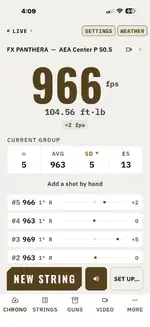
Here is what shows up on the app for me. I’m guessing that you need to go to screen settings and select detailed. If you have the other setting selected, it will only show velocity. FX definitely hurts in the documentation department.
IMG_7865.webp
 

Create an account or login to comment

You must be a member in order to leave a comment

Create FREE account

Create a FREE account on our community. It's easy!

Log in

Already have an account? Log in here.

Trending in this forum

Back
Top