

Billm
Grand HAMster

I’ve pretty much finished my remote ballistics display. I designed a mount so that it is easily moved between scopes with no tools. It connects to the BCsolver ballistics at Airgunfun on your phone via Bluetooth. It shows the holdover data for the selected range, rifle, scope and pellet/slug.
It has two way communications with the app and a touch screen. Mount it on your scope and use your parallax wheel to find the range of your target. If it doesn’t match the range you entered into the ballistics app, no problem, tap the upper portion of the screen and increase the entered range in preset jumps. If the target is closer than entered, just tap the lower portion of the screen, to decrease the entered range. No need to touch or look at your phone. It sends the updated range to the App.. The ballistics app then sends the updated ballistics solution back to the display . The screen will tell you how many clicks if elevation or windage that you need in either MOA or MiL. If you’re a visual person, tap the center of the screen and an appropriate reticle complete with visual holdover will pop up. Shooting up into a tree or down a hillside, the unit will pass the tilt angle over the BCsolver and automatically factor it into the holdover/under calculations.
If you’re like me and don’t always pay attention to your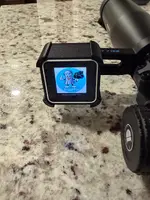
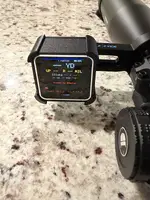
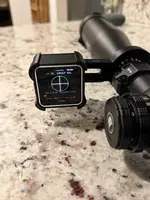
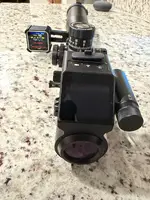 rifle cant, it gives a visual indication on the screen of any cant. If it’s green you’re good to go.
I figured I would try to make the most of the hardware. When you’re setting up a scope, lay the display on its back on a flat surface and tap the screen until it turns into a digital bubble level. Place it on its back on top of the elevation turret and adjust your scope until it’s level. It’s rechargeable from a USB cable.
I designed a rubber slip cover to give it some protection. The unit snaps in and out of the Holder. The scope bracket pushes onto the scope tube and is a cushioned friction fit. It does a few other things like show the velocity, projectile name and fpe.
It has two way communications with the app and a touch screen. Mount it on your scope and use your parallax wheel to find the range of your target. If it doesn’t match the range you entered into the ballistics app, no problem, tap the upper portion of the screen and increase the entered range in preset jumps. If the target is closer than entered, just tap the lower portion of the screen, to decrease the entered range. No need to touch or look at your phone. It sends the updated range to the App.. The ballistics app then sends the updated ballistics solution back to the display . The screen will tell you how many clicks if elevation or windage that you need in either MOA or MiL. If you’re a visual person, tap the center of the screen and an appropriate reticle complete with visual holdover will pop up. Shooting up into a tree or down a hillside, the unit will pass the tilt angle over the BCsolver and automatically factor it into the holdover/under calculations.
If you’re like me and don’t always pay attention to your
rifle cant, it gives a visual indication on the screen of any cant. If it’s green you’re good to go.I figured I would try to make the most of the hardware. When you’re setting up a scope, lay the display on its back on a flat surface and tap the screen until it turns into a digital bubble level. Place it on its back on top of the elevation turret and adjust your scope until it’s level. It’s rechargeable from a USB cable.
I designed a rubber slip cover to give it some protection. The unit snaps in and out of the Holder. The scope bracket pushes onto the scope tube and is a cushioned friction fit. It does a few other things like show the velocity, projectile name and fpe.


