

Billm
Grand HAMster

I’ve been working on a project designing an app that functions as a match management hub, target generator, challenge creator, video hosting, and a ballistic solver with reticles etc. I created an armory where shooters can store their favorite airgun, pellets and slugs. it’s actually become an obsession at this point.
I’m now breaking the ballistic solver out as a semiautonomous app. It will allow you to use just the ballistic section without the other sections (you can still use both). I have connected it live to FX chronographs and I will try to combine Chrono data to the shooters armory entries. Personally I think the FX apps are a little clumsy and I don’t fully get how some of the info is useful to me for tuning.
Only the FX True Ballistic Chronograph and the FX Pocket Chronograph Pro will connect via Bluetooth. Other chronos can be used, but you will have to enter the data into the app. Android devices will connect to the chronograph seamlessly with no user interaction required. I have intentionally created a Progressive Web Application (PWA). It works like an app but does not have to be sold or listed in the Apple App Store or Google Play. This means there is no fees from either platform and most importantly they can’t shut the app down due to political pressure. Apple effectively punishes PWAs by not allowing PWAs to access Bluetooth, which is required to connect to the Chronograph. The workaround is to use a free App Blufy, browser which allows the PWA to use Bluetooth. It is totally safe and Apple approved. But it means IPad and IPhone users will be prompted to allow it to download Blufy. It can be bypassed with one click if you don’t want to connect to your chronograph. I’m using it and it’s effortless. I don’t know if Garmin or Athlon chronographs have a developer kit. If they do, I may add them later.
I want this to be a useful airgun tuning tool. I’m terrible at keeping records and my memory is not the greatest. I can be lazy and I want a tool that makes all of this as easy as possible.
I’ve never used Strelok, I have used a couple of other ballistic apps and I only have a basic need for them. My point being that I’m willing to consider input on needed/desired features.
I’m a hobbyist not a professional developer. I’ve been coding since the 1970s and built all of my own websites over the years. This means that initial users are the “Beta Testers” and there will be bugs found and repaired along the way. It’ll be rough at times, but will smooth out with time and input and patience.n
I had three major goals with this project:
1. Make it useful to a broad range of airgunners: hunters, match shooters, plinkers, tinkerers- wherever you fit in.
2. Make it immune as much as possible to being de-platformed by non Airgun friendly forces.
3. Make it free or affordable. It is costing me considerable money and effort to build.
None of these tools are new. I’m just trying to bring them all together into a polished and hopefully easy to use platform. It will evolve. Some functions may be removed and some added as time goes on.
I have tried it with three shots. It’s raining here so not much shooting today.
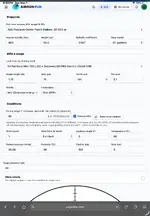
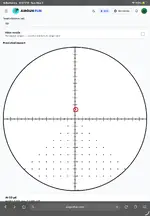
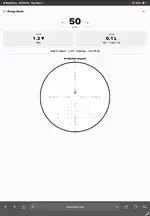
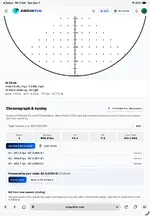
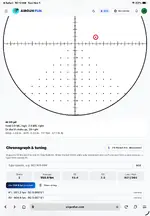
Below are a few screenshots. The first one us the range mode and is very basic for use out in the field or range with no internet. The others just show iPad screenshots showing the live chronograph data.
The app is getting intricate and I’m working on adding documentation.

I’m now breaking the ballistic solver out as a semiautonomous app. It will allow you to use just the ballistic section without the other sections (you can still use both). I have connected it live to FX chronographs and I will try to combine Chrono data to the shooters armory entries. Personally I think the FX apps are a little clumsy and I don’t fully get how some of the info is useful to me for tuning.
Only the FX True Ballistic Chronograph and the FX Pocket Chronograph Pro will connect via Bluetooth. Other chronos can be used, but you will have to enter the data into the app. Android devices will connect to the chronograph seamlessly with no user interaction required. I have intentionally created a Progressive Web Application (PWA). It works like an app but does not have to be sold or listed in the Apple App Store or Google Play. This means there is no fees from either platform and most importantly they can’t shut the app down due to political pressure. Apple effectively punishes PWAs by not allowing PWAs to access Bluetooth, which is required to connect to the Chronograph. The workaround is to use a free App Blufy, browser which allows the PWA to use Bluetooth. It is totally safe and Apple approved. But it means IPad and IPhone users will be prompted to allow it to download Blufy. It can be bypassed with one click if you don’t want to connect to your chronograph. I’m using it and it’s effortless. I don’t know if Garmin or Athlon chronographs have a developer kit. If they do, I may add them later.
I want this to be a useful airgun tuning tool. I’m terrible at keeping records and my memory is not the greatest. I can be lazy and I want a tool that makes all of this as easy as possible.
I’ve never used Strelok, I have used a couple of other ballistic apps and I only have a basic need for them. My point being that I’m willing to consider input on needed/desired features.
I’m a hobbyist not a professional developer. I’ve been coding since the 1970s and built all of my own websites over the years. This means that initial users are the “Beta Testers” and there will be bugs found and repaired along the way. It’ll be rough at times, but will smooth out with time and input and patience.n
I had three major goals with this project:
1. Make it useful to a broad range of airgunners: hunters, match shooters, plinkers, tinkerers- wherever you fit in.
2. Make it immune as much as possible to being de-platformed by non Airgun friendly forces.
3. Make it free or affordable. It is costing me considerable money and effort to build.
None of these tools are new. I’m just trying to bring them all together into a polished and hopefully easy to use platform. It will evolve. Some functions may be removed and some added as time goes on.
I have tried it with three shots. It’s raining here so not much shooting today.
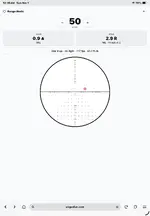
Below are a few screenshots. The first one us the range mode and is very basic for use out in the field or range with no internet. The others just show iPad screenshots showing the live chronograph data.
The app is getting intricate and I’m working on adding documentation.