

That’s the strange part, I did open the challenge and selected score my card. idk what happened.See my post above (#112). I learned this lesson, you have to open the challenge and select "Score my card". There is no select from profile scores option.

Install the app
How to install the app on iOS
Follow along with the video below to see how to install our site as a web app on your home screen.

Note: This feature may not be available in some browsers.
You are using an out of date browser. It may not display this or other websites correctly.
You should upgrade or use an alternative browser.
You should upgrade or use an alternative browser.
Target Generator - You Will Be Able To Create Your Own Targets
- Thread starter Billm
- Start date
- Latest activity Latest activity:
- Replies 137
- Views 3K

Playingdead
HAM Sharp Shooter

Found them. Went to Challenges. Matches are different. Got it!I only saw the 100 yard match available on the site. What am I missing?

Billm
Grand HAMster
- Original poster
- #123
Last edited:
I’m still tweaking it. I’ve resumed the score my card and now if it recognizes that it is a challenge target, it will ask you if you want to enter it as a challenge. I will try to shoot another challenge card tomorrow.That’s the strange part, I did open the challenge and selected score my card. idk what happened.


Billm
Grand HAMster
- Original poster
- #125
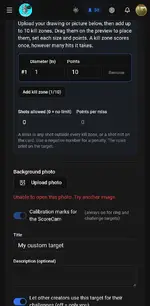
I’ll take a look at what it is doing.Bill, I get an error for any photo I try and click for upload when doing the challenge target designer.View attachment 24062
The original attempt was the following image, then I just started picking random photos.View attachment 24063
Billm
Grand HAMster
- Original poster
- #126
I didn’t have a problem uploading your image or one of mine. What type of device are you using to upload?Bill, I get an error for any photo I try and click for upload when doing the challenge target designer.View attachment 24062
The original attempt was the following image, then I just started picking random photos.View attachment 24063
A Samsung phone. I will try again.I didn’t have a problem uploading your image or one of mine. What type of device are you using to upload?View attachment 24067

Billm
Grand HAMster
- Original poster
- #129
What file type is it? I don’t know much about Androids, but iPhone image files don’t work in some of my apps because they use their own file type. My IPad may be converting your image begin the background prior to upload. Try a PNG or an SVG.It still gives the error, from the "app" or chrome browser on my phone.

wolfmangreg
HAM Ranger

Posted a score to the Big Game Challenge, but thought it best to post feedback here as the "main" thread.
No difficulty at all getting these actions done:
- Registration & editing profile
- Creating my armory
- Downloading a target
- Submitting scored target
Scoring the target took awhile:
- Tried several photos with different color backgrounds, could not get it to recognize more than 4/5 shots
- 3 were spot on, 1 pretty far off
- Found it easy to add new holes & fine tune their positions
- Could not figure out how to choose the errant hole to move it
- Ended up clearing all holes & adding all 5 manually
Gut feeling is that user error was to blame with selecting a hole for correction. That, or fat thumb on a small screen syndrome (done on my Pixel 9).
Next time will try from a desktop with a mouse- likely to make all manual scoring interactions easier & faster.
Overall, extremely impressive for software still in infancy!
No difficulty at all getting these actions done:
- Registration & editing profile
- Creating my armory
- Downloading a target
- Submitting scored target
Scoring the target took awhile:
- Tried several photos with different color backgrounds, could not get it to recognize more than 4/5 shots
- 3 were spot on, 1 pretty far off
- Found it easy to add new holes & fine tune their positions
- Could not figure out how to choose the errant hole to move it
- Ended up clearing all holes & adding all 5 manually
Gut feeling is that user error was to blame with selecting a hole for correction. That, or fat thumb on a small screen syndrome (done on my Pixel 9).
Next time will try from a desktop with a mouse- likely to make all manual scoring interactions easier & faster.
Overall, extremely impressive for software still in infancy!
Billm
Grand HAMster
- Original poster
- #131
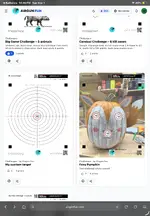
I’ve been working on challenge scoring for the last 5 hours and still working on it. Scoring a challenge is turning out to be extremely challenging - pun intended. I created the foxy pumpkin challenge so that I could fix the image upload and also provide a difficult background to score. It may have changed several times while you were trying it out. I may have to limit challenge targets to using very basic images or maybe just outlines. I will work on it for a few more hours and if it doesn’t improve, I’ll either intentionally limit it or temporarily suspend it. The other option is to consider challenges to be semi-automated scoring. I also need to rewire the scoring logic for challenges. Of course in my opinion match scoring is more important as it has to work to encourage people to get involved. Match scoring is somewhat easier because we can limit the number of shots per bull and I can color the rings to provide the most accurate scoring. I will probably create some 10m targets that don’t use black.Posted a score to the Big Game Challenge, but thought it best to post feedback here as the "main" thread.
No difficulty at all getting these actions done:
- Registration & editing profile
- Creating my armory
- Downloading a target
- Submitting scored target
Scoring the target took awhile:
- Tried several photos with different color backgrounds, could not get it to recognize more than 4/5 shots
- 3 were spot on, 1 pretty far off
- Found it easy to add new holes & fine tune their positions
- Could not figure out how to choose the errant hole to move it
- Ended up clearing all holes & adding all 5 manually
Gut feeling is that user error was to blame with selecting a hole for correction. That, or fat thumb on a small screen syndrome (done on my Pixel 9).
Next time will try from a desktop with a mouse- likely to make all manual scoring interactions easier & faster.
Overall, extremely impressive for software still in infancy!
One of the things that I fixed today is the magnifying loupe when manually adding shots.ni didn’t realize it was placing hits in the wrong place - fixed.
To remove errant hit, there are several scenarios:
1. If you just added a hit and don’t want it, scroll down and hit ‘remove one’.
2. If you want to go to another one and either move it or remove it: tap it: then use the arrows to move it or hit ‘remove one’ to delete it. Do not hold your finger to the screen, you will add one
3. To add a hit press the screen and slide the crosshairs around to where you want to place it. When you lift your finger off of the screen, it will place the new hit. If you don’t like where you placed it, hit ‘remove one’.
I need to test the video section and so I’ll make some short how to videos eventually lol.
wolfmangreg
HAM Ranger
Thanks Bill, no doubt it was my fat thumbs & lack of dexterity.
Honestly, doing all five manually was both fast & easy.
Honestly, doing all five manually was both fast & easy.
All files tried were JPG. I will convert to png and try again.What file type is it? I don’t know much about Androids, but iPhone image files don’t work in some of my apps because they use their own file type. My IPad may be converting your image begin the background prior to upload. Try a PNG or an SVG.
I set myself up as a content creator account, but have not tried to use the video side yet. This is the portion that can become the biggest resource sink.I’ve been working on challenge scoring for the last 5 hours and still working on it. Scoring a challenge is turning out to be extremely challenging - pun intended. I created the foxy pumpkin challenge so that I could fix the image upload and also provide a difficult background to score. It may have changed several times while you were trying it out. I may have to limit challenge targets to using very basic images or maybe just outlines. I will work on it for a few more hours and if it doesn’t improve, I’ll either intentionally limit it or temporarily suspend it. The other option is to consider challenges to be semi-automated scoring. I also need to rewire the scoring logic for challenges. Of course in my opinion match scoring is more important as it has to work to encourage people to get involved. Match scoring is somewhat easier because we can limit the number of shots per bull and I can color the rings to provide the most accurate scoring. I will probably create some 10m targets that don’t use black.
One of the things that I fixed today is the magnifying loupe when manually adding shots.ni didn’t realize it was placing hits in the wrong place - fixed.
To remove errant hit, there are several scenarios:
1. If you just added a hit and don’t want it, scroll down and hit ‘remove one’.
2. If you want to go to another one and either move it or remove it: tap it: then use the arrows to move it or hit ‘remove one’ to delete it. Do not hold your finger to the screen, you will add one
3. To add a hit press the screen and slide the crosshairs around to where you want to place it. When you lift your finger off of the screen, it will place the new hit. If you don’t like where you placed it, hit ‘remove one’.
I need to test the video section and so I’ll make some short how to videos eventually lol.
Billm
Grand HAMster
- Original poster
- #135
It definitely had some issues. I went back and looked at regular target scoring and all of my changes had created some issues.
It shouldn’t be too bad I’ve made it scalable and offloaded it to a dedicated CDN. It’ll be interesting to see.I set myself up as a content creator account, but have not tried to use the video side yet. This is the portion that can become the biggest resource sink
Do you want me to start trying out the video server side of things?It definitely had some issues. I went back and looked at regular target scoring and all of my changes had created some issues.
It shouldn’t be too bad I’ve made it scalable and offloaded it to a dedicated CDN. It’ll be interesting to see.
It continues to give the same error/message even with png for image upload on challenge target (web app and chrome browser). I will have to try on my tablet and/or computer as well, so I can better see how widespread it's hate of me is.What file type is it? I don’t know much about Androids, but iPhone image files don’t work in some of my apps because they use their own file type. My IPad may be converting your image begin the background prior to upload. Try a PNG or an SVG.

Billm
Grand HAMster
- Original poster
- #137
That’s weird, I made that test challenge target using your image with no mods. I just downloaded it from your post and uploaded it.Do you want me to start trying out the video server side of things?
It continues to give the same error/message even with png for image upload on challenge target (web app and chrome browser). I will have to try on my tablet and/or computer as well, so I can better see how widespread it's hate of me is.
Well, good news is it works without issue on my tablet. The Galaxy of calibers now exists. The other good news is since I had to ask my wife to get involved, the background rings were the way I wanted anyway, so mo betta.That’s weird, I made that test challenge target using your image with no mods. I just downloaded it from your post and uploaded it.
Similar threads

- Replies
- 9
- Views
- 197


- Replies
- 9
- Views
- 938

- Replies
- 0
- Views
- 185


