




Last edited:
An avatar is a custom image that represents you in the HAM Community. You can upload an avatar for your profile from different places.
1. Change the default avatar
2. Add an avatar you have already
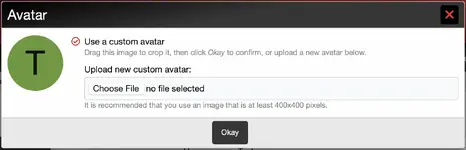
Click on the Edit link to see this form:
3. Make an avatar from a photograph on your computer or phone
Click Choose File and select the image from your device. Below is an example of how you can adjust the image after upload. Grab the image (mouse click or tap and hold) and drag it up/down or left/right. When you find the right spot, click the Okay button:
1. Change the default avatar
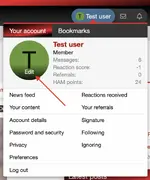
- 1. Open your account menu, hover over your current avatar (the first letter of your username) and click Edit:
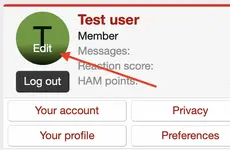
- 2. On the Community landing page (called Forum List), hover over your current avatar and click Edit:
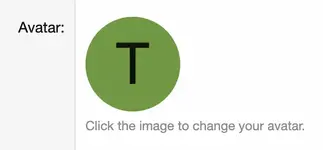
- 3. Open the account menu and click Account details (the direct link is https://community.hardairmagazine.com/account/account-details). Click on your current avatar to edit it:
2. Add an avatar you have already
Click on the Edit link to see this form:
3. Make an avatar from a photograph on your computer or phone
Click Choose File and select the image from your device. Below is an example of how you can adjust the image after upload. Grab the image (mouse click or tap and hold) and drag it up/down or left/right. When you find the right spot, click the Okay button:


