
All the experience showsI’m fully retired and I’ve always built my own websites since before the internet exploded and it’s so much easier nowadays.

Install the app
How to install the app on iOS
Follow along with the video below to see how to install our site as a web app on your home screen.

Note: This feature may not be available in some browsers.
You are using an out of date browser. It may not display this or other websites correctly.
You should upgrade or use an alternative browser.
You should upgrade or use an alternative browser.
Target Generator - You Will Be Able To Create Your Own Targets
- Thread starter Billm
- Start date
- Latest activity Latest activity:
- Replies 138
- Views 3K

Billm
Grand HAMster

- Original poster
- #103
Added a challenge mode. I’ve seen a lot if the YouTube airgun challenges and thought I’d add an easy way to make a fun scorable challenge system. What’s the difference you ask? In my mind a challenge is a fun, but less formal competition. A lot of the YouTube challenges use holiday themes, cartoons, drawings etc. a Creator can upload their own image and add up to 10 kill zones to the target with point values. The kill zones can be dragged around and placed and sized anywhere on the target area. The targets are fully scorable. There is a leaderboard for each challenge. When you score your target, it gives you the option to download an image file with your score etc. that you can upload to a HAM challenge thread or FB , instagram etc.. you can also use preset challenge targets if you like. I’ve added two, but will be adding more. I made a Wild Game chalkenge live so anyone can try it. Shoot it at whatever range you like. The Bug Game Challenge is ideal for shorter ranges.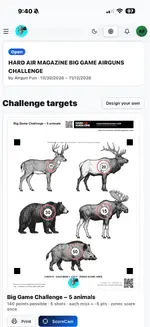




I’m having some scaling issues with the 50y Br targets they print 1.75 to scale. When I increase the percentage on the print icon, they still print out the same size. I did it manually on the printer, and I got close to the 2 inch, but the target does not print completely.
This may be a me problem but either way I need some tech support, it’s been a long time since I worked for Radio Shack .
This may be a me problem but either way I need some tech support, it’s been a long time since I worked for Radio Shack
.
Billm
Grand HAMster
- Original poster
- #106
Is it the PDF file? I’ll take a look at it. I’ve never checked any of mine. I guess I need to lol. It’s been 40 years since I worked part-time at the Shack.I’m having some scaling issues with the 50y Br targets they print 1.75 to scale. When I increase the percentage on the print icon, they still print out the same size. I did it manually on the printer, and I got close to the 2 inch, but the target does not print completely.
This may be a me problem but either way I need some tech support, it’s been a long time since I worked for Radio Shack
View attachment 23964View attachment 23965

Some feedback on the challenge system.
1) I liked the ability to just select print target and have them without having to open the challenge itself, or the file. However, save target option would also be nice there.
2) Next to print target is score target in the main challenge page with all challenges listed. If you select that it will indeed score the target, with zero credit toward the associated challenge. I realized I had to select the open challenge button, and then the score challenge target option for it to count. Not bad rework for the big game target, but potentially a lot more for something with 20+ targets/shots.
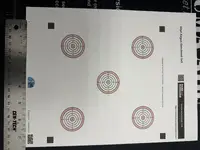
3) 4 out of 5 shots were clean, seemingly easily recognized holes but only the one for target 1 registered. The other 4 had to be manually input (not hard, just as a feedback note).
1) I liked the ability to just select print target and have them without having to open the challenge itself, or the file. However, save target option would also be nice there.
2) Next to print target is score target in the main challenge page with all challenges listed. If you select that it will indeed score the target, with zero credit toward the associated challenge. I realized I had to select the open challenge button, and then the score challenge target option for it to count. Not bad rework for the big game target, but potentially a lot more for something with 20+ targets/shots.
3) 4 out of 5 shots were clean, seemingly easily recognized holes but only the one for target 1 registered. The other 4 had to be manually input (not hard, just as a feedback note).
Billm
Grand HAMster
- Original poster
- #108
I’m working on it. I need to print some other targets to see if it’s all of them or not. I did this and tried several things that did not work. Then I found out it is only with iPads and iPhones. For some reason Apple decided that these two devices has to force a 1/2” margin on each side. A MAC does not, nor should a PC or android. I’ve added a work around when using these two devices. I’m testing it now. Anyone using an IPhone or IPad to print targets before this change will need to reprint any targets printed earlier.I’m having some scaling issues with the 50y Br targets they print 1.75 to scale. When I increase the percentage on the print icon, they still print out the same size. I did it manually on the printer, and I got close to the 2 inch, but the target does not print completely.
This may be a me problem but either way I need some tech support, it’s been a long time since I worked for Radio Shack
View attachment 23964View attachment 23965
Billm
Grand HAMster
- Original poster
- #110
I actually included a save file function and removed it and may bring it back later. I will have to step through #2 so that I fully grasp what you’re describing. Do you have a copy of that target that didn’t score right. It’s difficult to get camera scoring to work without dedicated hardware and will undergo some refinement the more that I play with it.Some feedback on the challenge system.
1) I liked the ability to just select print target and have them without having to open the challenge itself, or the file. However, save target option would also be nice there.
2) Next to print target is score target in the main challenge page with all challenges listed. If you select that it will indeed score the target, with zero credit toward the associated challenge. I realized I had to select the open challenge button, and then the score challenge target option for it to count. Not bad rework for the big game target, but potentially a lot more for something with 20+ targets/shots.
3) 4 out of 5 shots were clean, seemingly easily recognized holes but only the one for target 1 registered. The other 4 had to be manually input (not hard, just as a feedback note).
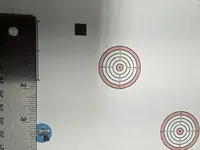
Here is the photo I used.I actually included a save file function and removed it and may bring it back later. I will have to step through #2 so that I fully grasp what you’re describing. Do you have a copy of that target that didn’t score right. It’s difficult to get camera scoring to work without dedicated hardware and will undergo some refinement the more that I play with it.
Attachments
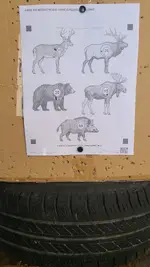
I realized after replying that what I mentioned in #2 is actually about scoring for credit vice just scoring. I initially did it at on the page with all challenges listed, thinking it would score to the challenge.I actually included a save file function and removed it and may bring it back later. I will have to step through #2 so that I fully grasp what you’re describing. Do you have a copy of that target that didn’t score right. It’s difficult to get camera scoring to work without dedicated hardware and will undergo some refinement the more that I play with it.
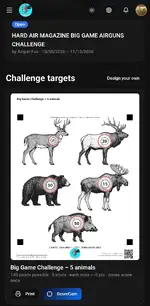
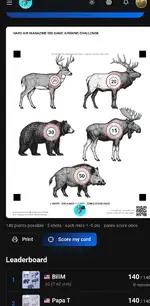
Afterwards I realized I needed to click the open button at the top of the above picture and then I got to score again so that it actually counted for the challenge. "Score my Card" versus "ScoreCam".
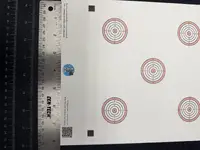
Scaling is good now, but your logo and the QR code are not printing completely.I’m working on it. I need to print some other targets to see if it’s all of them or not. I did this and tried several things that did not work. Then I found out it is only with iPads and iPhones. For some reason Apple decided that these two devices has to force a 1/2” margin on each side. A MAC does not, nor should a PC or android. I’ve added a work around when using these two devices. I’m testing it now. Anyone using an IPhone or IPad to print targets before this change will need to reprint any targets printed earlier.
Billm
Grand HAMster
- Original poster
- #114
Thanks, I’ll just slide those up a couple of lines.Scaling is good now, but your logo and the QR code are not printing completely.
View attachment 23977

Playingdead
HAM Marksman
If this wind would settle down I would try. I will still at least shoot at it later to try the scorer.
Billm
Grand HAMster
- Original poster
- #116
I have tweaked the way target scoring is done now in an effort to reduce friction. New targets printed will now add the name of the target to my QR code now. You don’t have to do anything, this is all automatic. When you score one of these newly printed targets your phone will find the QR code and read the name and automatically select the correct target type being scored - you don’t have to select anything. I haven’t tested it myself yet. The target selector will still be there in case a target doesn’t have the updated QR code yet.
Playingdead
HAM Marksman
Worked great for me. I did the big game target and just needed to align the black boxes and it was happy. Wind killed me today , but I still pulled a 140 
See my post above (#112). I learned this lesson, you have to open the challenge and select "Score my card". There is no select from profile scores option.Bill, I have a scored big game target that was saved in my profile how do I enter it into the challenge?
Playingdead
HAM Marksman
I only saw the 100 yard match available on the site. What am I missing?See my post above (#112). I learned this lesson, you have to open the challenge and select "Score my card". There is no select from profile scores option.
Similar threads

- Replies
- 9
- Views
- 258


- Replies
- 9
- Views
- 957

- Replies
- 0
- Views
- 189


